Estimated reading time: 5 minutes
September brought an update packed with improvements across the DMS and the services that make up the Autologica ecosystem. Here’s the best of this month.
- eLearning Platform Improvements
- Comparison Dashboard in Autologica Analytics
- Improvements to Vendor Payments
- New Filters for the Due Dates Agenda
- Voucher Report: New Filters, Columns, and Export
- Vehicles
- More Features in Web Modules
- Accounts
eLearning Platform Improvements
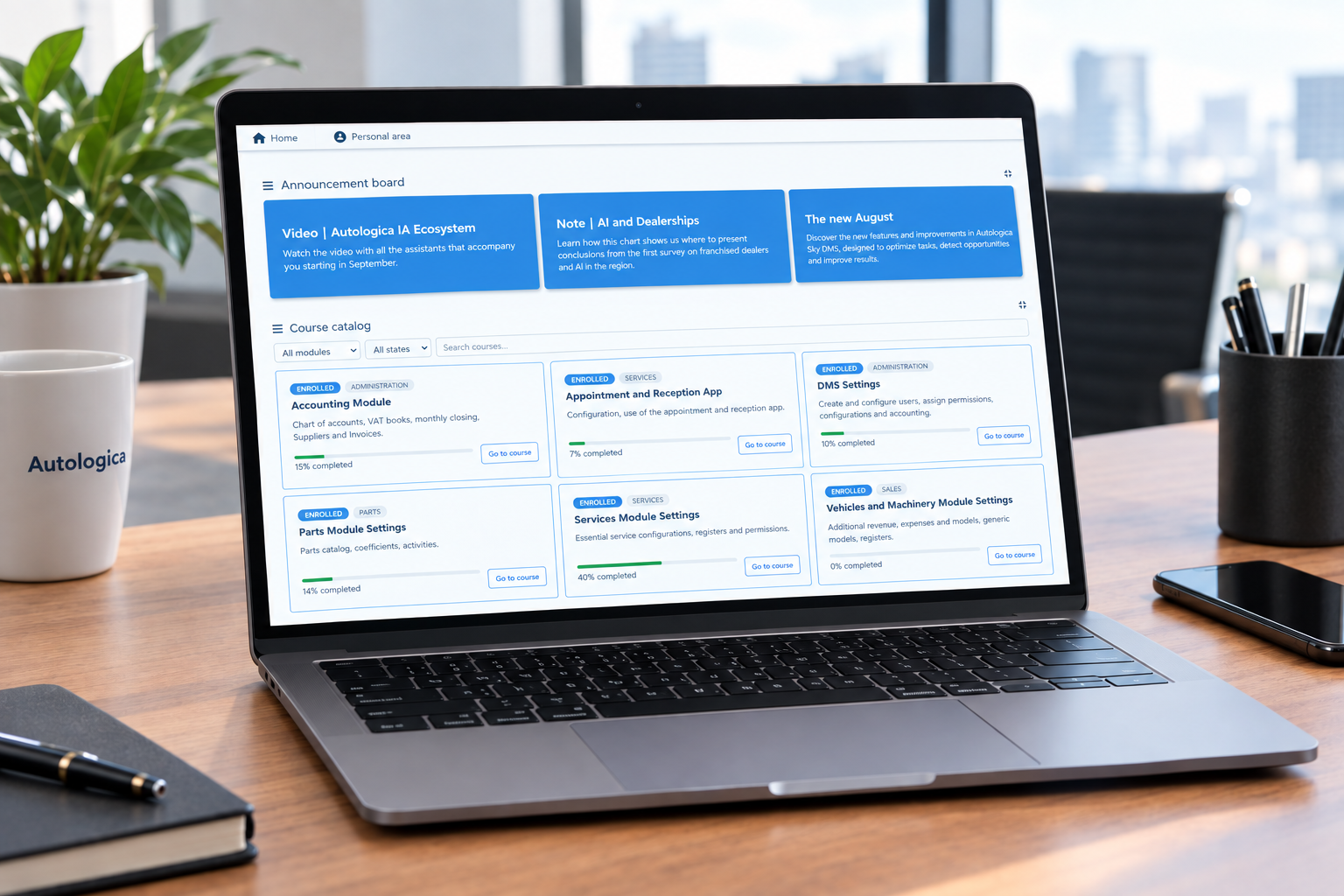
Autologica Academy is the free training platform for customers, focused on using the DMS and the products and services that are part of the Autologica ecosystem. We made major changes focused on the user experience.
- New course | Best Practices for Using AI at the Dealership.
- A redesigned home page so you can quickly pick up the courses you were taking.
- Quick access to your certificates.
- If you’re responsible for Human Resources, you can now personally track each member of the dealership team. New hires? Create a report listing the courses they need to complete and check their progress every day.
- New, more interactive content for a more engaging learning experience and better results.
Comparison Dashboard in Autologica Analytics
Analytics is the data analysis tool built into the DMS, used by managers and owners to measure KPIs and make decisions based on reliable, up-to-date information.
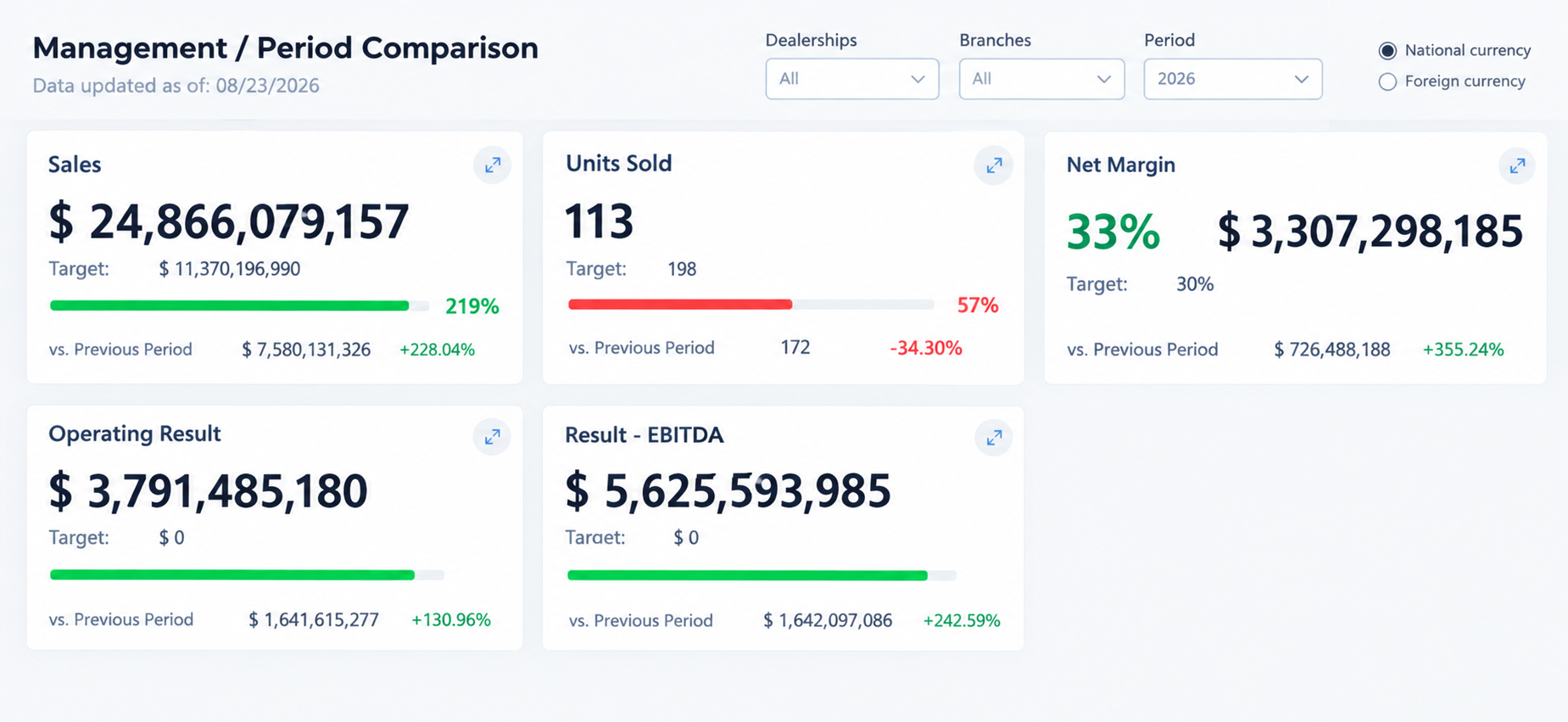
To take analysis even further, we built a new dashboard that lets you compare current performance against the same period last year, bringing together key indicators such as sales, units sold, aftersales net margin, operating result, and EBT result.
Administration
Improvements to Vendor Payments
We’ve added new features for operations carried out from the “Pay Vendors” button.
- Choose the Date field to generate vouchers and calculate withholdings using a date other than the current day.
- Enter the Non-Taxable Amount on advance payment orders.
- Use the USD to Apply column to allocate vouchers in dollars.
- Complete vouchers without an assigned good or service before generating the payment order.
This way, payments are recorded with the actual date, withholdings are calculated on the correct basis, and allocating amounts in foreign currency no longer requires manual conversions.
New Filters for the Due Dates Agenda
We’ve added the “Overdue by X Days” filter, which uses the report’s issue date as its reference point, plus a column showing the voucher type description in the exported file.
This makes it easier to focus on genuinely overdue debt, and the exported file is clearer.
Voucher Report: New Filters, Columns, and Export
The Voucher Report now includes:
- Filters by Currency, Type, VAT, and Due Date Detail.
- Columns for Tax ID (CUIT) and amounts in both pesos and dollars.
- An Export button that generates an Excel file of the report.
These changes give you greater control over voucher data, and exporting to Excel is now just a click away.
Vehicles
Foreign Currency Amounts on the Vehicle Record
Now, from the Entry/Exit and Documentation tabs on the vehicle record, you can choose to view amounts in local or foreign currency.
Real price, margin, and cost values are recalculated using the exchange rate from each individual voucher, rather than a single general exchange rate. This lets you review dollar amounts directly from the vehicle record, with no manual conversions needed.
More Features in Web Modules
We’ve optimized your dealership’s daily operations with new features designed to save time and minimize margin for error:
Web RO | Generate Shared Sales
The web repair order now lets you allocate repair costs in bulk by percentage across the customer, manufacturer, finance company, or dealership. For example, the customer can pay 30% and the shop 70%, with each party billed for its share.
This speeds up billing when different parties are covering the same job and reduces errors.
Web RO | Generate Third-Party Jobs
We’ve added a “Generate Third-Party Jobs” button to the web repair order, making it easier to manage work performed by outside providers within the RO. Available for dealerships using Web RO.
Web Orders | Copy Customer Parts to Purchase Orders
You can now directly move pending parts from sales orders into a new purchase order to a vendor, with no manual entry required.
Accounts Receivable/Payable Reports
Changes to the Sales and Purchases VAT Ledgers
Sales VAT Ledger: 0%-rated items as Non-Taxable. When the customer is a Registered Taxpayer, items taxed at 0% (for example, port sales) are now reported in the Non-Taxable Amounts column instead of being added to Taxable Amounts. This requires record 5201 to be configured. Learn More →
Purchases VAT Ledger: 0%-rated import items as Non-Taxable. Items taxed at 0% on import vouchers are now reported in the Non-Taxable Amount column instead of being added to the Taxable Amount. This requires permission 5201 and the voucher type to be identified as an import voucher. Learn More →